A backup is useful when it can restore the records you need. A downloaded CSV can reproduce your Litecoin quantity while leaving behind an unused account, saved balance checks or other context you expected to keep. A second import can also skip records instead of replacing the current ledger.
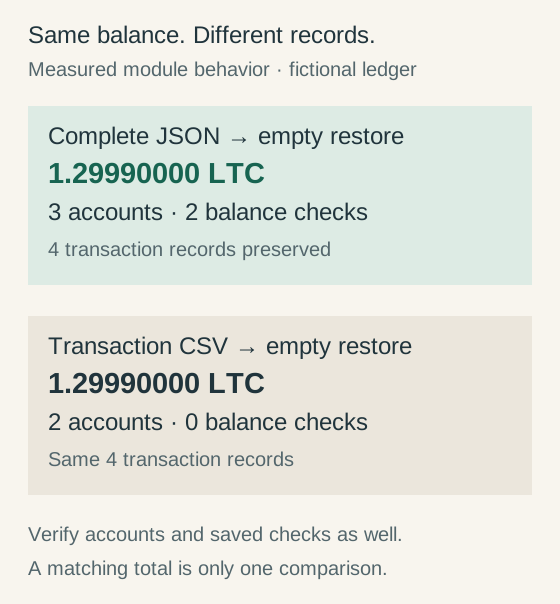
We tested the current Litecoin.watch portfolio modules with a fictional four-record ledger. Complete JSON restored all three accounts and both saved balance checks into an empty portfolio. CSV restored the transactions and the same 1.2999 LTC quantity, but reconstructed only the two used accounts and no saved checks.
This guide turns those results into a practical backup check: save the right file, verify its contents in a separate empty environment, and preserve your original records while you test.
Reviewed 12 October 2026. Tests exercised byte-pinned production module functions in Node.js with Web Crypto and fictional records. No real browser storage, wallet secrets, accounts or transactions were accessed. We did not perform a browser-interface restore, test cloud storage or measure cross-browser compatibility.
Keep record backups separate from wallet recovery
The Litecoin.watch portfolio tracks what you enter: purchases, sales, internal transfers, historical currency rates and balance checks. Its JSON file records that history. It does not contain the signing keys needed to spend Litecoin.
| Material | What it preserves | What restoration establishes |
|---|---|---|
| Appropriate wallet recovery material | Signing access and relevant wallet configuration | Requires the correct wallet-specific recovery procedure |
| Portfolio JSON | Tracker accounts, transactions and saved balance checks | A restored record set; no control over coins |
| Portfolio CSV | The supported exported transaction fields | Restored rows; some account/check context is absent |
Keep both forms of recovery appropriate to your situation. A perfect record backup cannot recover signing keys, and a successful wallet restore does not recreate your acquisition prices, cash fees or private notes. The wallet recovery tests address signing and discovery separately.
Do not put a seed, private key or wallet file into the portfolio's notes or import fields. The record backup is designed to carry financial history and account labels. Those can still be sensitive even though they cannot sign a payment.
Export complete JSON and check the actual saved file
In Transaction history, choose Backup JSON for the complete record set. Use Export CSV when you want inspectable transaction rows or another supported workflow. Keep the actual JSON file somewhere separate from the browser profile that holds the live portfolio.
The page reports when a complete backup download was requested and whether the current records match that requested export. That status does not prove a file reached the intended folder, survived a later deletion or passed a restoration test. Open your downloads, check the filename and file size, and record where the copy is kept.
The browser's stored portfolio can persist after closing a tab. MDN's localStorage documentation explains that storage belongs to the document's origin and persists across sessions; private-session storage has different persistence. A file outside the profile gives you a separate recovery route when site data is cleared or you move to another environment.
Keep the original download unchanged while checking it. If you open a CSV in spreadsheet software, save any edited working copy under a different name. Renaming a CSV to end in .json does not turn it into a complete JSON backup.
What our four-record exercise actually restored
The fixture has three accounts: Exchange records, Offline wallet and Unused account. Two separate fills each buy 0.75 LTC at a fictional $96 price with a $0.60 cash fee. Their dates, amounts, prices, fees and notes are identical, but their transaction identifiers are different.
Next, 0.4 LTC moves to Offline wallet with an extra 0.0001 LTC fee. A final 0.2 LTC sale from Exchange records uses a $120 execution price and $0.25 cash fee. Purchases cost $145.20 in total and the sale returns $23.75. The remaining quantity is 1.5 − 0.0001 − 0.2 = 1.2999 LTC.
| Field | Original | JSON restore | CSV restore |
|---|---|---|---|
| Transaction records | 4 | 4 | 4 |
| Account definitions | 3 | 3 | 2 used accounts |
| Saved balance checks | 2 | 2 | 0 |
| Combined quantity | 1.29990000 LTC | 1.29990000 LTC | 1.29990000 LTC |
| Transfer amount and fee | 0.4 + 0.0001 LTC | Preserved | Preserved |
| Saved trade FX and valuations | Present | Preserved | Preserved |
CSV carries current transaction fields, including account identifiers/names, transfer fees, historical FX, pre-trade valuations and notes. The limitation is specific: an account that no transaction references is not reconstructed, and saved balance checks are not exported. Our CSV was parsed directly from the exporter; spreadsheet editing was not tested.
The fixture's saved Exchange records check declares 0.9 LTC against a calculated 0.8999, leaving a 0.0001 LTC difference. JSON restores that comparison too. CSV produces the correct transaction quantity but has no saved check to show the difference. A matching headline total is therefore insufficient to prove full record fidelity.

Importing into an existing ledger is a merge
The import screen previews additions and skipped records. Confirming it adds the merged result while keeping existing transactions. It does not replace the entire portfolio with the file's snapshot.
| Starting state | Added | Skipped | Result |
|---|---|---|---|
| Empty default portfolio | 4 | 0 | Full normalized snapshot restored |
| Same complete ledger | 0 | 4 | Unchanged; both identical separate fills retained |
| One original fill already present | 3 | 1 | All four records present afterward |
| Same transaction ID with changed quantity | No merge | No merge | Conflict rejected |
| Existing account name and balance check | 0 transactions | 4 | Existing name/check retained |
Repeated complete backups deduplicate the records in this test without collapsing its two distinct identical fills into one. Check the expected record count when working with other exports: deduplication is an import rule, not independent proof that two entries describe the same real event.
We also measured two less obvious limits. When the populated target had an existing account name and saved check, importing the backup retained them. An imported check dated 30 September did not replace the target's existing 29 September check. A transaction differing only in historical FX and pre-trade valuation was also counted as a duplicate; the existing metadata stayed.
This is why importing into a populated ledger is a different exercise from verifying a fresh restore. Review those fields deliberately. If you need to correct an existing record, use the appropriate editing workflow and verify the result instead of assuming a later backup will overwrite it.
Check an encrypted backup before relying on its password
The optional encrypted JSON control protects the downloaded record file with AES-256-GCM. The reviewed module derives its key using PBKDF2-SHA256 with 600,000 iterations and generates a 16-byte salt and 12-byte nonce. The portfolio already stored in the browser remains unencrypted.
We exercised that exact encryption module through Node's Web Crypto implementation. The correct test password decrypted the original JSON text exactly; parsing and merging it into an empty state restored the whole fixture. A wrong password, a changed ciphertext byte and a changed nonce each caused decryption to reject. Two encryptions of the same text produced different salt, nonce and ciphertext values.
MDN's AES-GCM parameters explain the nonce and authentication requirements. Its key-derivation reference describes PBKDF2, and the encryption API documentation identifies browser secure-context requirements. Our tests check these specific module outcomes; they are not a cryptographic audit or browser-compatibility survey.
Use a separate backup-file password, keep it separately from the file and test decryption while you still have the original records. A forgotten password has no recovery mechanism here. Encrypting one download does not protect an already compromised device or transform the file into wallet recovery material.
Verify restoration in a separate empty environment
Preserve the original browser portfolio. Open the tool in a separate browser profile or another environment with no existing portfolio records. Check that it is empty before importing. Clearing the original site's data to simulate a disaster creates an unnecessary chance of losing the very records you are checking.
For ordinary JSON, use Import JSON or CSV. For encrypted JSON, enter the file password in the encrypted-backup section and choose Decrypt and preview a backup. Review the proposed additions before confirming. In our fresh-state fixture, the expected preview is four additions and zero skipped transactions.
| Check | Fixture target | Why check it |
|---|---|---|
| Transaction identity and count | 4 unique IDs; 2 separate fills | Catch omitted or duplicated events |
| Account definitions | All 3 names, including Unused account | Catch incomplete account restoration |
| Saved balance comparisons | 2 checks; main difference 0.0001 LTC | Preserve the evidence of an unresolved mismatch |
| Account quantities | 0.8999 main; 0.4 wallet; 0 unused | Catch misplaced transfer legs |
| Trade and transfer metadata | Recorded FX, valuations, notes and fees match | Keep more than the headline quantity |
Use targets from your own saved records for a real test. Current market value can change between export and restoration, so compare recorded quantities and historical fields first. A saved statement difference should remain visible until you investigate it; the restore should not invent a transaction to remove it.
Import the same complete backup a second time in the test environment and inspect the preview. Our fixture produced zero additions and four skipped records. Record the date you actually completed the check. If you used a private session for testing, keep the downloaded backup independently of that temporary session.
Repeat the check after changes that matter
Create a new complete backup after adding or correcting meaningful records, renaming accounts, entering historical FX or saving a balance comparison. Keep a previously verified copy while checking the new one, with dates in the filenames so you can identify the intended snapshot.
The page's backup status helps show whether records changed since the last requested complete export. It still requires you to verify the actual file and its restoration. A CSV-only export does not establish that accounts and saved checks were backed up.
A successful restore checks record portability. Verifying that those records match actual wallet or exchange statements is another task, covered in our portfolio reconciliation guide. Once records are reliable, the return-measurement path helps distinguish quantities, recorded costs and investment performance.
Download the fixture, source snapshots and checklists
The release includes the fictional complete JSON backup, its transaction CSV, results and 60 passing assertions and 13 reported cases. Keep these teaching records in a test environment; do not add them to your actual ledger.
For reproduction, download the Node test script, input fixture and pinned source package. The README explains extraction and running in a fresh temporary copy. The calculation checks independently use integer litoshis and scaled integer dollars. Our production version check matched the seven source snapshots and the corresponding assets loaded by the portfolio page.
The plain-text restore record and CSV checklist provide blank fields for your own completed check. No recovery secrets belong in either. Checksums identify this release's files; they do not independently certify record truth.
Research, code and drafting used AI assistance. The measured scope is module behavior with fictional data, including encryption through Node Web Crypto. No real browser-profile migration, cloud recovery, device-security audit or independent external review is claimed.
The artwork record identifies the generated conceptual hero and original explanatory diagram.