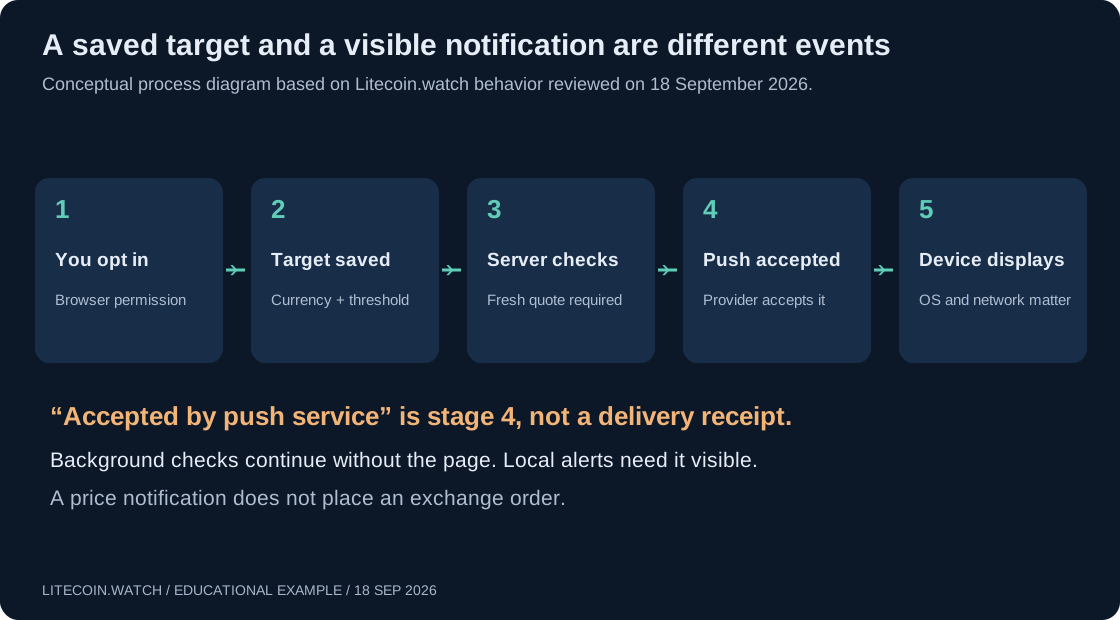
Reviewed 18 September 2026. This guide documents the Litecoin.watch alert interface and server behavior available on that date. Browser requirements are linked to primary documentation. Illustrations and sample prices are explanatory, not live market data. The cover is a diagram of the example or system described in this guide.
A price alert can be useful when you want to check the market only after a condition is observed. But “notifications enabled” can mean two different things: a visible webpage may show a desktop notification, or a server may monitor a target and send Web Push while the page is closed.
Litecoin.watch provides both modes. This guide explains which one to choose, how to set up a background target, what the status messages actually establish, and how to test the complete route on your own phone or computer.
Open the tool: Litecoin price alerts. No account, connection, or payment is needed. An alert is a reference-price notification; it does not place, cancel or fill an order.
1. Choose background alerts or local alerts
| Question | Background Web Push | Local alerts |
|---|---|---|
| Where is the target evaluated? | On the server | In the open webpage |
| Intended check interval | Once per minute | Every five seconds while visible |
| Does closing the page stop evaluation? | No | Yes |
| Does a hidden tab keep evaluating? | Server evaluation continues | Local evaluation pauses |
| Notification permission | Required to connect this browser | Optional for desktop display; on-page alerts can work |
| Where are targets stored? | Server, with a browser device credential | Browser local storage |
| What happens after firing? | History; create a new target to monitor again | Rearm the existing local target if desired |
| Execution of trades | Never | Never |
Giving the local-alert section permission to show desktop notifications does not turn it into the background service. A local target is not automatically copied to the server. If you want monitoring after closing the page, create the target in the section explicitly headed Background price alerts.
Web Push uses a subscription associated with the browser or installed web app. A service worker can handle a message without an open page, but device state, network access and system policies still affect delivery. The MDN Push API documentation explains that distinction. Closing a tab is not the same as shutting down a device or disabling all browser background activity.

2. Set up a background price target
- Open the real site in your intended browser. Use https://litecoin.watch/alerts/. An embedded browser inside another app may lack the needed push features.
- Find Background price alerts. Wait for its support/status message. If it says background notifications are unavailable, use a compatible browser or the local mode; there is no benefit in repeatedly clicking.
- Choose Enable background alerts. The permission request must come from your deliberate action. Allow notifications if you want this browser to receive them.
- Wait for the connected state. The page should report that the browser is connected and show the target form. A dismissed or blocked permission request is not a completed setup.
- Select Currency. Choose USD, EUR or PLN. The target amount is the price of one LTC in that currency.
- Choose At or above or At or below. The comparison includes equality. Enter a positive Target price.
- Choose Save background target. Confirm that a card for the correct currency, direction and price appears with the status Monitoring and an expiry time.
The button labels above follow the site's interface. Once connected, the connection button reads Reconnect notifications. You can pause or resume an unfired target, delete one target, or choose Disable and remove all background alerts to remove this browser's server records.
Pause does not reset the 90-day lifetime. A target that has already fired or expired is history; create a new background target rather than expecting Resume to rearm it. A target already satisfying its condition when saved can fire at the next eligible check. It does not have to cross the threshold again from the other side.
3. Set it up on a phone
iPhone and iPad
Apple introduced Web Push for Home Screen web apps in iOS and iPadOS 16.4. The documented route is to add the website to the Home Screen, open that installed web app, and request permission through a direct interaction such as pressing the enable button. An ordinary tab should not be assumed to have the same behavior. Source: WebKit's Web Push announcement and requirements.
Open the alerts page in Safari, use the sharing menu's Add to Home Screen option, and launch it from its new icon. Then follow the background setup steps inside that app. Wording can differ between OS versions. Also check the web app's notification settings and Focus configuration if a saved target changes state without a visible banner.
Android
Open the page in a full browser that supports Web Push. Check both the site's notification permission and the operating system's permission for that browser. A permission at one layer does not override a at the other. Background restrictions and battery-management settings can affect when a notification is shown.
Do not assume a browser inside a social app or messenger has the same support as your normal browser. If the tool reports an unsupported browser or push service, open the URL in another supported full browser and set up the target there. A target saved in one browser profile does not automatically appear in another.
Desktop computers
Check the site's permission in the browser and the browser's notification permission in the operating system. Notification behavior can change when the whole browser is quit, background operation is disabled, the computer sleeps or a Do Not Disturb mode is active. Test the specific setup you intend to use rather than relying only on the presence of an Allow button.
Browsers restrict permission prompts, and a previously denied request may need to be changed in site settings. Repeatedly pressing Enable is not a reliable way to reverse a denial. Source: MDN notification permission guidance.
4. Run a controlled end-to-end test
There is no dedicated “send test notification” button in the current interface. You can instead create one temporary target that already meets the condition. This tests a saved target, a server observation and the actual delivery route.
- Use a fresh observed quote in the currency you select. The calculator can help check the currency and source timestamp.
- Create a clearly labeled-in-your-notes temporary test condition. For example, if a fresh LTC/USD quote were $80, an At or above target of $79 would already qualify. These numbers are illustrative, not today's price.
- Confirm that the target appears as Monitoring. Keep a record of its currency, direction, price and the approximate creation time.
- Close the page or move away from it, leaving the device online with notifications permitted. Allow more than one scheduled check; a one-minute schedule is not a guaranteed delivery deadline.
- Check the device's notification center as well as banners. Open the alerts page again and inspect the target's status.
- After the test, delete the temporary target if you no longer need its record. Create your real monitoring target separately.
If you see a notification, that confirms delivery for that device, browser profile and set of conditions at that time. It does not establish permanent availability. If the card says Accepted by push service but the device showed nothing, the server-side handoff succeeded but the display path still needs investigation.
Do not test by entering seed words, linking an exchange or making a transaction. None of those actions is part of this alert service.
5. Understand every background status
| Displayed status | Meaning | Next action |
|---|---|---|
| Monitoring | The saved target is armed; fresh eligible data is still required | Check currency, direction and expiry |
| Paused | The target is not being evaluated | Resume if still wanted and unexpired |
| Sending | The condition was observed; delivery is queued or being retried | Inspect again; do not assume it was displayed |
| Accepted by push service | The provider accepted the notification | Check the device; this is not a display receipt |
| Delivery failed | The provider rejected it or the delivery attempt window failed | Read the error; reconnect if the subscription expired |
| Expired | The target reached its lifetime limit without firing | Create a new target if still needed |
The page refreshes the connected browser's target list periodically while visible. A displayed status can therefore lag a recent server action. Reloading can also retrieve the latest state. The status Server monitoring is running describes a recent worker heartbeat; it does not guarantee that every currency's price inputs are fresh or that a phone can display notifications.
6. Why a chart can cross your target without an alert
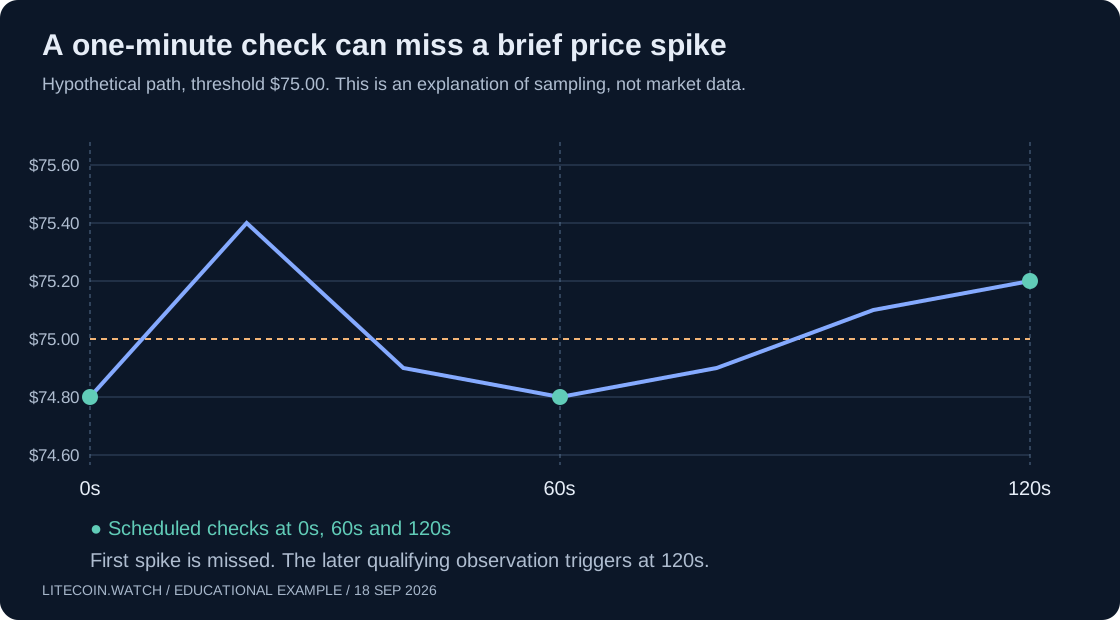
The server evaluates available reference quotes on its scheduled checks. It does not receive and retain every tick from every exchange. A short excursion above or below a threshold can happen between observations, leaving no qualifying value at the times the target is evaluated.

In the illustration, a $75 threshold is briefly exceeded at 20 seconds, but the observations at 0 and 60 seconds are both below it. That first spike is missed. A later move remains above the threshold at 120 seconds, so that observation qualifies. The line is a hypothetical price path, not a recording of Litecoin trading.
A different exchange's chart can also disagree with the reference feed. Compare the pair, quote currency, source and timestamp before treating a mismatch as a failure. A USD target and a PLN chart are not equivalent unless the relevant FX conversion is taken into account.
For background checks, LTC inputs older than five minutes and any required FX inputs older than fifteen minutes are rejected. EUR and PLN may come from a direct quote or a conversion path when valid inputs are available. FX-market closures can therefore affect monitoring in those currencies. The service waits for eligible data instead of treating an old value as current.
The age threshold is a maximum eligibility rule, not a promise that quotes update at that interval. Likewise, checking once per minute describes the intended schedule, not a service-level guarantee. Outages, task delays and push-provider or device delays can extend the time to a notification.
7. Troubleshoot in the right order
| Symptom | What to check first | Useful next step |
|---|---|---|
| Enable is unavailable | Browser feature support and secure site URL | Use a supported full browser; on iOS use the Home Screen route |
| No permission prompt appears | Existing site permission or a prior denial | Review browser site settings and OS notification settings |
| Target form does not appear | Whether connection completed or an error was shown | Read the status; reload and reconnect if appropriate |
| Saved target remains Monitoring | Freshness, currency, comparison direction and sampling | Compare source timestamps, not just a chart high/low |
| Server monitoring is delayed | Recent server heartbeat | Retry later; targets remain saved but timing is uncertain |
| Accepted, but no notification was visible | OS/browser permissions, Focus, notification center and connectivity | Repeat one controlled test on the intended device |
| Delivery failed with expired subscription | Old browser subscription | Reconnect this browser and create a new target |
| Targets disappeared after changing browser | Different device credential/storage context | Return to the original profile or set up the new one |
| Local alerts stop when switching tabs | Expected local-mode behavior | Create a separate background target |
| Old quote when FX markets are closed | Whether fresh direct or required FX inputs exist | Wait for eligible data; do not treat stale data as current |
The fastest diagnostic is to separate three questions: was the target saved, did a valid observation trigger it, and did the device display the message? Changing a price threshold will not fix a denied OS permission. Changing OS permission will not make an expired target active again.
8. Use local alerts deliberately
In the Local alerts — while this page is visible section, choose Alert currency, enter the target, choose Above or Below and press Add alert. Check the visible monitoring status and keep the page open and visible. These comparisons also include equality.
Local monitoring checks every five seconds while the page is visible and the data is usable. Hiding or closing the tab pauses that mode. A local alert fires once until you rearm it; the page also offers pause controls. Optional desktop notifications and sound are presentation choices, not a server-monitoring switch.
A local alert is useful during an active dashboard session or when background notifications are unavailable. It is not a substitute for a server target when you want to close the site.
9. Limits, storage and removal
- Currencies: USD, EUR and PLN.
- Background lifetime: 90 days from target creation, including time spent paused.
- Background limits: up to 20 active targets per connected browser, counting paused and queued targets, and 100 total records including history.
- Storage: the server retains the push subscription, targets and status information; the browser keeps a device credential. Local alerts stay in browser storage.
- No account sync: changing device, browser profile or storage context is not an automatic migration.
Use Disable and remove all background alerts while the browser still has its connection information if you want to remove its server records. Revoking browser notification permission stops display, but does not by itself delete those records. Clearing site data first can remove the credential needed to manage the old subscription; automatic retention cleanup remains separate. See the privacy policy.
Do not share a browser profile or exported site-storage data as a way of moving alerts. A connected profile can manage its targets. Set up a separate subscription on the intended new device instead.
Frequently asked questions
Will this sell my LTC when the price is reached?
No. A price alert is not a stop order, or trading bot. It cannot guarantee an executable price. See the net-return guide for why a reference quote differs from cash proceeds.
Can I get alerts with no page open?
Background targets are checked by the server without an open page. Delivery still requires an eligible subscription and a device/browser environment that can receive and display the push message. Local targets require the page to be visible.
Does Accepted by push service mean the phone showed it?
No. It confirms acceptance by the push provider, not an acknowledgement from your eyes, lock screen or notification center. Complete a real-device test.
Why did my target trigger as soon as I saved it?
The current rule checks whether an observed price is at or beyond the chosen threshold. If that condition was already true, it can qualify at the next check; a new crossing is not required.
Verification, sources and downloads
The UI labels, comparison rules, schedule, expiry and storage behavior were reviewed against the production page and the site's implementation on 18 September 2026. This article is not a claim that push delivery was tested on every phone or browser. The reader's controlled test above is the final check for their own device.
Primary references: MDN Push API, MDN notification permissions, and WebKit's iOS/iPadOS Home Screen Web Push requirements. Download the hypothetical sampling example as CSV. All diagrams are explanatory SVGs, not simulated screenshots of an actual successful delivery.